Received Messages
A searchable record of the messages received by all your accounts. Use it to look up history, find a particular conversation, or see what came in while you were away.
You can filter by account, search by text or number, and export the whole record as an Excel file. This is a read-only record. To reply, open the conversation in the workbench under Instances.
Filter by account, search, and export.
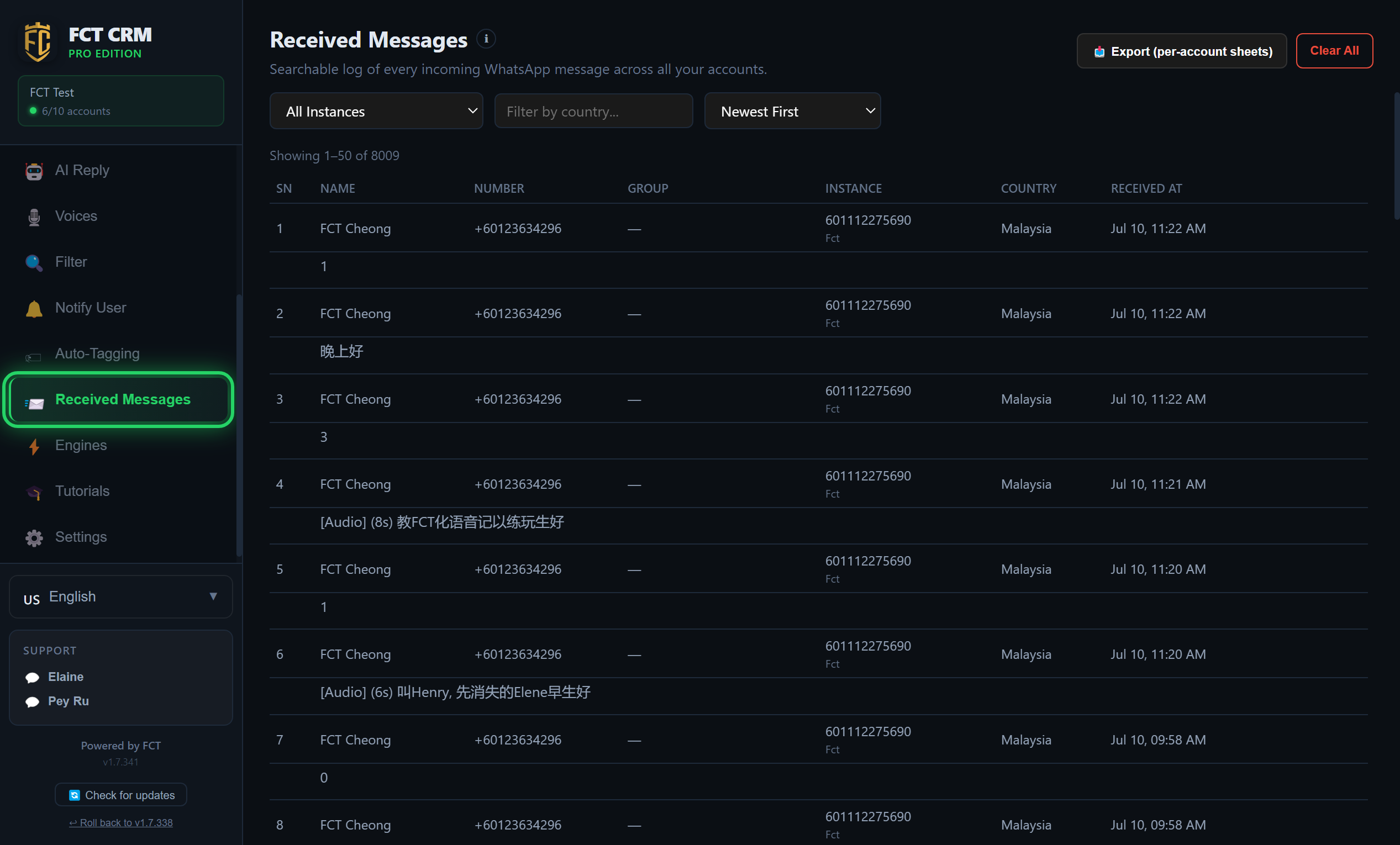
- Click Received Messages in the left sidebar. Each record in the list has two lines: the top line shows the name, number, group, receiving account, country and time received, and the bottom line shows the message itself.
- To find a certain sentence or a certain person, type a keyword, a name or a number into the search box. The list immediately keeps only the matching records. Text transcribed from voice notes can be searched too.
- To see only the messages one account received, click the All Instances dropdown and choose that account.
- To view by country, type the country's name into Filter by country..., written the same way it appears in the Country column.
- The dropdown on the far right switches the order between Newest First and Oldest First.
- Each page shows fifty records. When you have read them, scroll to the very bottom and click Next →.
- To save a copy to your computer, click Export (per-account sheets) at the top right and choose where to save it. You get one Excel file with one sheet per account.
Clear All cannot be undone
The red Clear All button empties every record here, and they cannot be recovered afterwards. Export a copy before you click it.